Jaxviel: Android portrait-to-video creative toolkit with privacy focus
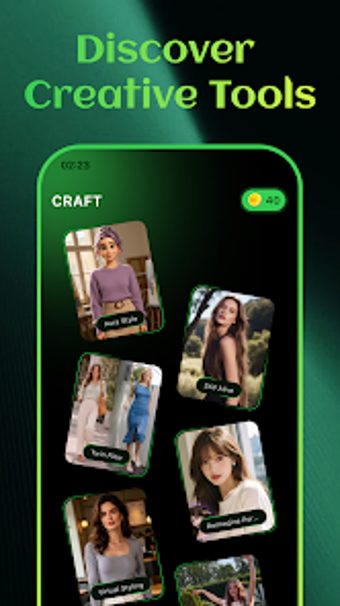
Jaxviel, from SWIFTORA LIMITED, is an Android visual-creative utility that converts standard portraits into stylized images and short videos. The app uses self-developed internal algorithms to apply artistic presets, portrait fusion, and motion templates for social content and quick creative edits. Key tools include stylization presets, portrait reimagining, and single-photo animation, aimed at content creators and casual users who want polished visual output without external data sharing concerns.
What does Jaxviel actually do for portraits and short videos?
The app performs on-device rendering to transform photos into stylized results using named tools such as Aura Style, Reimagine Portrait, and Virtual Styling. For moving images it provides Twin Flow, Still Alive, and Rhythm Spark, which combine source photos with thematic templates to produce short dynamic clips. Each tool targets a distinct output: color and texture shifts, artistic scene fusion, or rhythmic animation of a single frame.
Does it affect device performance during rendering?
Rendering runs on the device's local resources because the app uses internal algorithms rather than external servers; that means CPU and GPU are engaged for creative processing. For users on recent Android devices the app is compatible with current hardware; heavy stylization and multi-frame video generation will naturally use more processing time and battery than single-image filters, so scheduling longer renders during charging or idle periods reduces disruption.
Is it safe to use with personal photos and biometric data?
The app emphasizes privacy by performing all AI processing locally with its own algorithms and by automatically erasing source images after rendering completes, so images are not sent to third-party AI services. That read-and-delete behavior limits external exposure of biometric content and aligns with hands-off data handling, though users should still manage local device backups and gallery copies separately to keep control over originals.
Do I need technical knowledge to produce acceptable results?
The app targets creators and casual users with template-driven workflows, so basic use involves selecting a preset and a source photo, then letting the app render the result. Advanced adjustments are available through style selection and template combinations; those who want finer control can experiment with different presets and twin-photo pairings, while newcomers can rely on automated templates to produce publishable outputs quickly.
Practical judgment: suited for creators who prioritise privacy and quick stylization
Jaxviel is a pragmatic option for Android creators who need on-device portrait stylization and short video generation with a strong privacy posture. Its automatic deletion of source images and internal rendering reduce external data exposure, though complex video renders will tax device resources. For best results, run longer projects while the device is charging and use templates for rapid output. Recommended.